
Inbox
Compose an individual email or reply
Use CC, BCC, recipient variables, templates, signatures, and files.
Write a message
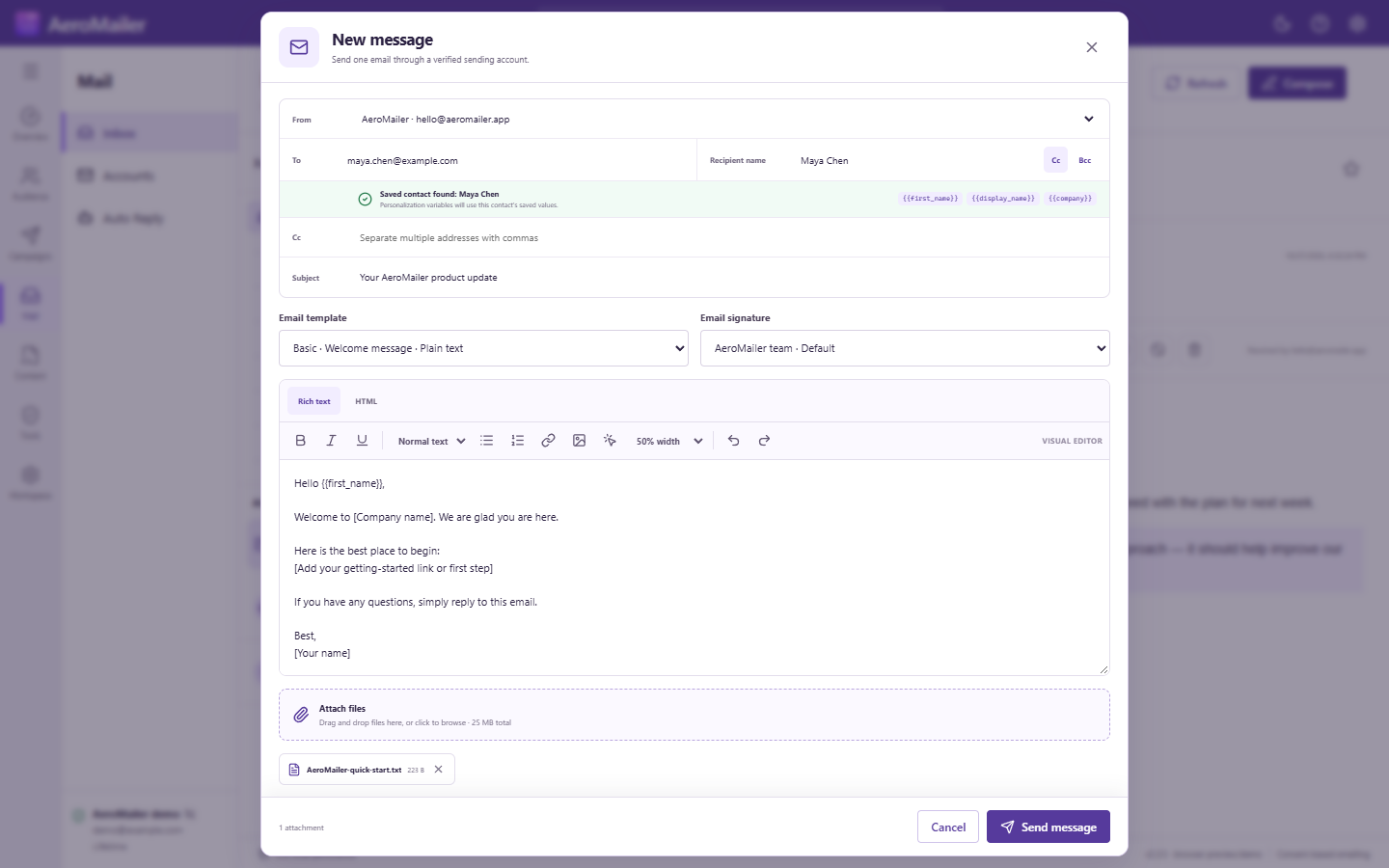
- In Inbox, select Compose, or open a message and select Reply.
- Choose a verified sending account, enter To and an optional recipient name, and open CC/BCC if needed.
- Enter a subject. If the To email matches a contact, the composer shows available personalization values.
- Select an Email template or write in the Plain text/HTML editor. Plain-text delivery removes visual formatting.
- Choose an Email signature, add attachments, and review the recipient and content.
- Select Send message and wait for success or an error before closing.
Review personalization and privacy
Check missing values before sending. CC addresses are visible to recipients; BCC hides the copied addresses. Template selection loads its content into the composer, so choose it before doing extensive edits.
Attachment and footer limits
The individual composer allows up to 20 MB per file and 25 MB total before transport encoding; providers may accept less. Individual messages do not automatically receive the campaign STOP footer. Confidential mode and copy/forward prevention are not implemented.